Downloads are useful for big console-style titles. They are unnecessary for a huge number of excellent games that already run in Chrome, Edge, Firefox, or Safari. If you want entertainment without installing software, browser games are still one of the smartest options.
Below are 15 no-download games you can play through a browser, with clear reasons each one earns a place on the list. Most are available on Playbyt for instant play.
Why “no download” still matters
Skipping an install helps when you are on a shared computer, a school laptop with restrictions, a phone with limited storage, or simply do not want another app icon. Browser games also make it easier to try something new: if a title is not for you, close the tab and move on.
Puzzle games with zero install
1. Zen Leap 3D
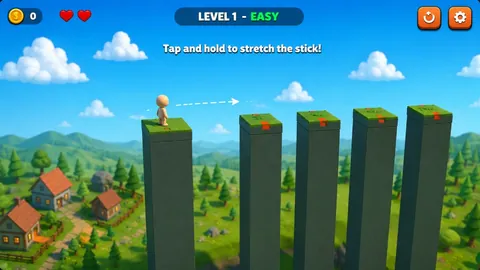
Zen Leap 3D is a calm precision game. Hold to stretch a stick, release to drop it between pillars, and aim for the perfect landing zone. The miniature 3D look feels polished for a free browser title.
Best for: short, focused sessions where timing matters more than chaos.
2. ThreadTrap
ThreadTrap challenges you to untangle overlapping threads until the layout is clean. It is a topological puzzle — satisfying when a messy knot finally resolves.
Best for: players who enjoy logic over reflexes.
3. Gem Memory
Gem Memory is a classic matching challenge with gem cards. Flip pairs, remember locations, and clear the board efficiently.
Best for: memory practice and relaxed play.
4. Connect 4
Connect 4 brings the familiar vertical-connect strategy into the browser. Plan blocks, force threats, and outthink an opponent or a quiet solo practice session.
Best for: quick strategy without learning a complex rulebook.
Casual no-download favorites
5. Snake Classic
Snake Classic keeps the timeless grow-and-avoid formula. Eat, get longer, and survive your own trail.
Best for: players who want a familiar arcade loop in seconds.
6. Screw Puzzle
Screw Puzzle mixes physics with sequencing. Remove screws in the right order so planks fall without trapping progress.
Best for: tactile puzzle fans who like cause-and-effect challenges.
7. Tower Climb 3D
Tower Climb 3D asks for precise jumps across platforms as you scale a tall structure toward the exit.
Best for: platforming practice in short bursts.
8. Bucket Drop
Bucket Drop is a short casual/puzzle pick in the Playbyt catalog. Open it when you want something light and easy to restart.
Best for: warming up before denser puzzles or longer sessions.
Action and racing without an installer
9. Traffic Racer
Traffic Racer puts you on an endless highway where lane changes and distance records matter. It is a pure browser driving challenge.
Best for: players who want speed without a racing-game download.
10. Drift Zone
Drift Zone focuses on sliding control and track feel. Learning when to ease off and when to commit is part of the fun.
Best for: driving fans who prefer style and handling.
11. TankWars
TankWars is a tank combat title in the Playbyt shooter category. Open it when you want a browser action session built around aiming and vehicle combat.
Best for: short action sessions (catalog does not list it as multiplayer).
12. Ballon Bluster
Ballon Bluster is a click-accuracy shooter where popping targets builds score and rhythm.
Best for: aim warm-ups and stress-free action.
Multiplayer games that skip the download
13. Smash Karts
Smash Karts is built for shared chaos. Race, bump, and laugh with friends from different devices as long as everyone has a browser.
Best for: groups who refuse to sync app installs first.
14. Roblox FPS
Roblox FPS delivers first-person shooter action in the browser with multiplayer support. It is a strong example of how competitive genres no longer always need a separate client.
Best for: players who want gunplay without leaving the browser.
15. Mystery Word
Mystery Word is an Event Battle word race across 8 levels (one retry then OUT) with live event-board scores. No download is required to join.
Best for: word fans who want event-style competition rather than a private room duel.
Quick comparison tips
| If you want… | Start with… |
|---|---|
| Calm focus | Zen Leap 3D, Gem Memory |
| Arcade nostalgia | Snake Classic, Ballon Bluster |
| Driving thrills | Traffic Racer, Drift Zone |
| Friends online | Smash Karts, Roblox FPS |
| Word play | Mystery Word |
How to keep no-download gaming smooth
- Close heavy background tabs if a 3D game stutters.
- Use headphones for games with useful audio cues.
- Prefer landscape mode on phones for racers and shooters.
- Share room links carefully in multiplayer games so friends join the correct match.
Want more ideas by audience? See games for student breaks and multiplayer browser games for friends.
Building a personal no-download playlist
A good playlist has three layers. Keep one calm puzzle for focus, one casual arcade game for energy, and one multiplayer option for friends. For example: Gem Memory for quiet evenings, Traffic Racer when you want speed, and Smash Karts when your group is online. Rotating those three roles prevents the “I already played everything” feeling that comes from opening the same title every day.
Revisit your playlist monthly. Browser catalogs change, and your taste changes too. If a game starts feeling automatic, swap it for a neighboring genre instead of forcing another identical session.
Performance expectations in 2026
Modern browsers handle 2D puzzles easily on almost any laptop. 3D racers and shooters need more GPU and memory headroom. If a title stutters, try a lighter game first rather than assuming browser gaming as a whole is slow. Closing unused extensions and updating the browser often recovers more performance than people expect.
Also remember that the first load caches assets. The second visit to the same Playbyt game is usually faster. That is one reason bookmarking favorites beats searching from scratch each time.
FAQ
Do browser games really need no download?
True browser games load assets in the tab. You should not be pushed into installing a desktop program just to start. Some titles may cache files automatically, which is normal browser behavior — not an app-store install.
Will these games work offline?
Usually they need a connection for the first load and for multiplayer. After caching, a few single-player titles may continue briefly, but online platforms generally expect connectivity.
Are no-download games only for beginners?
No. Many are easy to enter and hard to master. Cube-style puzzles, racers, and multiplayer shooters can challenge experienced players too.
Should I clear cache if a game breaks?
Sometimes yes. If a game fails after an update, a hard refresh or clearing site data for that domain can help. Try a refresh before more drastic steps.
Conclusion
You do not need a download folder full of installers to have a serious gaming session. From Zen Leap 3D to Smash Karts, these 15 browser games prove that instant play can still feel complete. Browse the Playbyt catalog, open a title that matches your mood, and keep your device free of extra apps.