Word games travel well. They work on modest hardware, fit into short breaks, and invite friends without requiring aim or racing reflexes. This guide covers free browser word games you can open on Playbyt — with clear notes on solo versus multiplayer modes so you pick the right one for the moment.
Why word games fit the browser so well
- Typing and tapping map cleanly to letters.
- Rounds can end in under five minutes.
- Skill gaps feel friendlier than pure reaction contests.
- Voice chat pairs naturally with guessing games.
Hangman 2 — the classic social guess
Hangman 2 supports online multiplayer: the host sets a secret word and the opponent guesses before the hangman drawing completes. It is one of the easiest “send a code and play” word nights you can run.
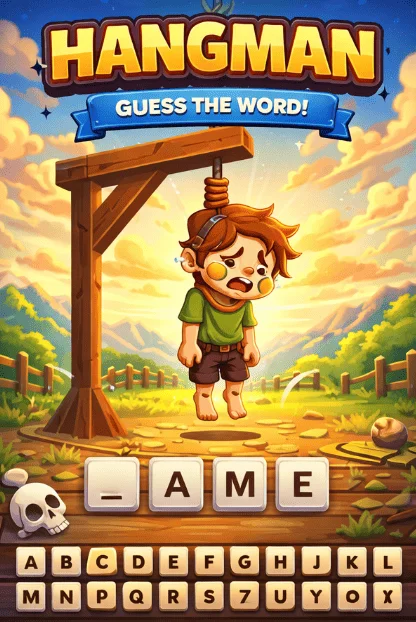
Host tip: agree on themes (movies, food, school topics) so words stay fair. Avoid obscure spellings that turn the round into a spelling bee nobody asked for.
Spell Finder — letter-grid word building
Spell Finder is a letter-grid challenge where you form words from the board (drag-to-form style play). It rewards scanning patterns rather than racing a clock against another player.
Best for: solo focus breaks and vocabulary warm-ups. Session length: easy to stop after one strong board.
Mystery Word — event-style word race
Mystery Word is built as an Event Battle word race: players work through levels with their own words, limited retries, and live scores on the Event Battle board. It is more structured than casual hangman and better when you want a shared event energy.
Read the in-game rules before you treat it like a private lobby duel — the format is event-oriented by design.
Emoji Decoder — puzzle reading, not typing alone
Emoji Decoder asks you to decode emoji puzzles across levels in an Event Battle format. It still sits in the “language and meaning” family even though you are interpreting symbols instead of spelling letter by letter.
Great palate cleanser after several text-heavy rounds of Hangman.
MindSort Protocol and Code Sprint — adjacent brain warmups
If you want word-adjacent thinking without pure spelling:
- MindSort Protocol — sorting and pattern organization.
- Code Sprint — faster symbolic/logic pacing in the educational category.
They are not classic crosswords, but they keep the “think before you tap” mood going.
How to run a 30-minute word game block
- Five minutes: Spell Finder solo warm-up.
- Fifteen minutes: Hangman 2 best-of-five with a friend.
- Ten minutes: optional Mystery Word or Emoji Decoder if you want event energy.
That structure works for study breaks and voice-chat hangouts alike. For student-timed breaks more generally, see games for short student breaks.
Fair play guidelines for friend hangman
- No dictionary apps if you agreed to play “from memory.”
- Hosts should avoid inside jokes as secret words unless everyone shares the context.
- Rotate who hosts so one person is not always picking.
- Keep a PG word list if younger siblings are in the call.
Accessibility and comfort notes
Increase browser zoom if letters feel small. Prefer well-lit rooms so screens are readable. If guessing games raise stress for someone in your group, switch to cooperative or solo boards without teasing them for opting out.
More puzzle variety: free puzzle games for problem-solving. Strategy/board angle: strategy and board games in the browser.
Building a personal word-game rotation
Rotate modes so language play does not feel like homework:
- One Hangman duel for social energy.
- One Spell Finder board for quiet focus.
- Optional Mystery Word or Emoji Decoder when you want event pacing.
If you play with mixed ages, keep a shared “allowed themes” list. That prevents awkward secret words and keeps the night welcoming.
What word games teach beyond vocabulary
They train pattern scanning, turn patience, and graceful losing. Those soft skills matter in every multiplayer session, not only in spelling contests. When a round goes badly, reset the tone with a sillier theme instead of escalating pressure.
Solo vs social: choosing the right word mode
If you only have ten minutes, Spell Finder or a single Hangman round is enough. If you have a voice call open, prioritize Hangman 2 or event-style Mystery Word so everyone participates. Mixing both in one night is fine — just announce the switch so nobody is mid-strategy when the format changes.
Keep a written backup word list for hosts who freeze under pressure. Ten everyday themes beat one obscure phrase that ends the fun.
FAQ
Are these good for vocabulary practice?
They can make word play habitual. They are games first — not a substitute for structured study plans or graded coursework.
Can I play word games on a phone?
Hangman 2 and many letter games work well with mobile keyboards. Event formats may feel tighter on small screens; try landscape.
Do I need an account?
Often you can start quickly. Accounts matter more for saved identity in multiplayer or event boards.
Conclusion
Free browser word games give you social guessing, solo letter grids, and event-style races without installing a vocabulary app. Start with Hangman 2 for friends, Spell Finder for solo focus, and add Mystery Word or Emoji Decoder when you want a louder shared format.